Spanish English Translator
HeapSol Technologies, IncBooks & Reference
4.45.00K Reviews
- Version
- 4.10017
- Installs
- 1.00M
- Age Rating
- Everyone
Screenshots
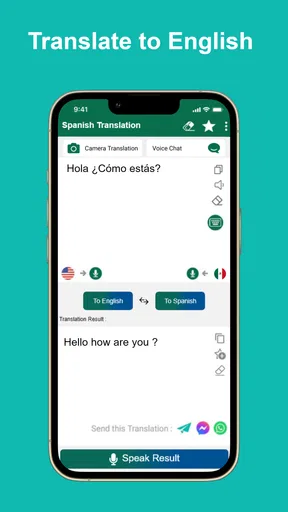
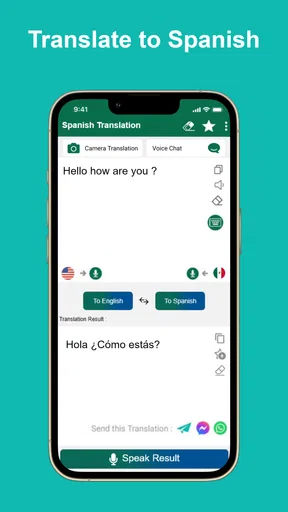
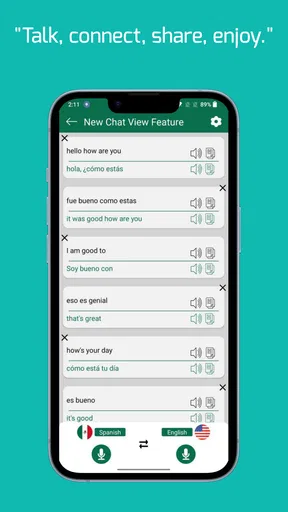
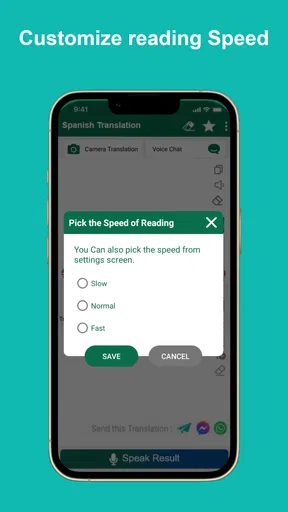
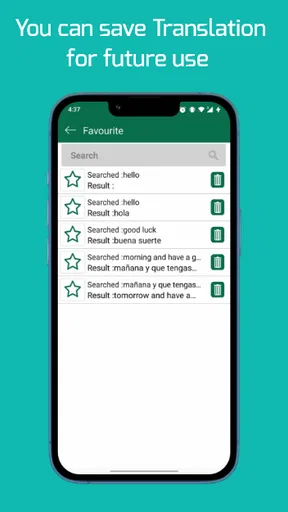
Our Review of Spanish English Translator
 Analysis by Appyee
Spanish English Translator is the kind of app I reach for when I need a quick answer rather than a full language lesson. It is a free Books & Reference app from HeapSol Technologies, Inc, built around translation between English and Spanish. The useful part is its offline focus: once it is ready on my phone, I can use it in situations where I do not want to depend on a live connection.
That makes it especially practical for a first-time learner, a traveler, or anyone who regularly moves between English- and Spanish-speaking conversations. I would not treat it as a replacement for a teacher or a serious writing assistant, but I found it convenient for short phrases, basic vocabulary, signs, messages, and quick checks. The experience is simple enough for a beginner, although getting the best result depends on understanding what kind of translation the app is designed to handle.
What to expect before you start translating
The app does one job clearly: it works as an English-Spanish translator and a Spanish-English translator. I like that narrow focus because there is less distraction than in a large language platform filled with lessons, flashcards, conversation courses, and account features. If your immediate need is to understand or produce a short sentence, a focused tool can be faster than opening a full study app.
Its offline capability changes how I think about using it. A web translator is often excellent when a connection is available, but that option becomes inconvenient in a basement, on a flight, in a rural area, or while traveling with mobile data turned off. This app is better suited to those moments. I would still prepare it before leaving home rather than waiting until the exact moment I need a translation.
It has been available since March 1, 2018, and the current version is 4.10017. The app has earned a 4.4 average from around 15 thousand ratings and has passed 1 million installs, which suggests that it has found a substantial audience for this straightforward use case. Those figures do not make every translation perfect, but they do give me confidence that this is an established utility rather than an experimental download.
The age rating is Everyone, and the minimum requirement is Android 5.0. That makes it accessible on many older Android phones, which is useful if you keep a spare device for travel or use a budget handset. It is also free, so trying it does not require a purchase decision. I would install it for a specific need and judge it by how well it handles the phrases I actually use.
Who will get the most from it
I think the strongest audience is made up of people who need practical bilingual help without a complicated setup. A Spanish learner can use it to check a word while reading. An English speaker visiting a Spanish-speaking country can prepare basic requests before entering a shop or asking for directions. Someone helping a Spanish-speaking neighbor or colleague can use it as a quick bridge during a short exchange.
It is also useful for building a small personal reference habit. When I meet an unfamiliar word, I can translate it, read the result, and then return to the original context. That is more useful than copying a whole paragraph and accepting an answer without understanding which word caused the difficulty. For simple vocabulary, the app can become a handy pocket companion.
I would skip it as my main tool if I needed polished professional writing, specialist legal or medical language, or a detailed explanation of grammar. Translation engines can miss tone, regional wording, implied subjects, and cultural context. For an important message, I would use the app to create a first draft, then ask a fluent speaker to review it. A dedicated learning app is also a better choice if your goal is structured progress rather than immediate translation.
Getting from installation to a useful first result
I’d make the first test a phrase you can already judge, such as a greeting or a simple request, and try it in both language directions. That gives me a practical baseline before I depend on the app away from a connection. Once the controls feel familiar, I can prepare the short, likely phrases that will make offline use genuinely helpful.
Start with a small phrase, not a difficult paragraph
After installing Spanish English Translator, I recommend beginning with something short and concrete. Try a greeting, a basic question, or one sentence from a message you already understand. This gives you a quick sense of the direction controls and the way the result is displayed without making the first test difficult to evaluate.
Before entering text, check whether you are translating from English to Spanish or from Spanish to English. That sounds obvious, but it is the easiest mistake to make when switching between languages quickly. I make a habit of looking at the selected direction before pressing the translation control, especially when I am helping another person and the phone is being passed back and forth.
For a first meaningful success, I would enter a phrase such as a polite request or a sentence describing an immediate need. Then I would compare the result with the situation, not just with a word-for-word expectation. A useful translation should communicate the intended idea. If the result looks strange, shorten the sentence and test the important phrase separately.
A realistic first-use scenario
Imagine arriving at a small café where the menu is mostly in Spanish. I might type the name of an unfamiliar item or a short question about ingredients. Once I understand the key word, I can use the app in the opposite direction to prepare a simple request. The important workflow is not translating an entire conversation at once; it is checking one small piece, acting on it, and translating the next piece only when necessary.
That approach also helps when speaking with someone. Suppose a neighbor explains a practical problem in Spanish and I only recognize part of it. I can ask them to repeat one short sentence, enter it, and use the result to identify the subject and action. If my reply needs to be translated, I should keep it equally short. Short exchanges reduce ambiguity and make it easier to notice when a result does not fit the context.
For study, I would save the original word in my notes after checking it rather than relying on repeated searches. The app can provide the answer, but remembering the word requires a second step from me. I find that writing a phrase in both languages and using it later is more effective than translating the same term several times without practice.
How to prepare for offline use
The word “offline” is the feature that deserves the most practical planning. I would open the app and test a few English-to-Spanish and Spanish-to-English phrases while I still have a reliable connection, then repeat the same test after temporarily disconnecting if that is convenient. This confirms that the app is ready for the situation I have in mind and prevents an avoidable surprise during travel.
I would also prepare a small set of likely phrases before a trip: greetings, directions, food-related questions, transport needs, and emergency basics. I would not assume that a last-minute installation automatically solves every travel problem. Offline tools are most valuable when they are treated as preparation tools, not just emergency downloads.
There is a useful trade-off here. Offline access improves availability and may feel more private than sending every request to an online service, but it does not guarantee that every unusual sentence will be understood perfectly. I would rely on it confidently for everyday phrases and vocabulary, while keeping a second plan for complicated conversations.
Common confusion with short translations
One word can have several meanings, and a translation app may need the surrounding sentence to choose the right one. If I enter an isolated word and the result seems wrong, I do not immediately blame the app. I add a short, natural phrase that shows the intended meaning. This is one of the simplest ways to improve a result without changing tools.
Word order can create another problem. English and Spanish do not always express ideas in the same sequence, and a literal-looking result may still sound unnatural to a fluent speaker. I use the output as a guide to meaning, then pay attention to whether it fits the person, place, and level of politeness involved. A translation that is understandable is not always the best translation to send unchanged.
Informal expressions deserve extra care. Slang, jokes, regional phrases, and irony often depend on culture rather than vocabulary. If a message matters, I would translate the plain meaning first and avoid sending an unfamiliar idiom until someone fluent confirms it. The app is most dependable when I give it clear language and use judgment about the result.
Making the app useful beyond the first lookup
After the initial test, I would create a repeatable routine. First, identify the key idea I need to communicate. Second, enter the shortest sentence that expresses it. Third, read the result in context. Fourth, if the wording feels uncertain, break it into smaller parts or ask a fluent person for confirmation. This workflow is more reliable than pasting a long block of text and treating the output as final.
For learners, the reverse direction is valuable. Instead of only translating Spanish into English, I can write a simple English sentence, translate it into Spanish, and then compare it with examples I have encountered elsewhere. This does not replace grammar study, but it encourages active production. I can also test slight variations, such as changing a greeting or making a request more specific, to see how the wording changes.
For parents or families, the Everyone rating makes the app approachable for basic schoolwork and everyday vocabulary practice. I would still supervise important assignments and encourage the student to explain the answer rather than copy it. Used that way, it becomes a checking tool. Used alone, it can hide gaps in understanding.
Where another option may be better
An online translator may be preferable when I need current terminology, long passages, or more advanced handling of context and voice. A dictionary is often better when I want definitions, pronunciation guidance, usage examples, or a detailed distinction between similar words. A language-learning course is the better investment when I need a planned sequence and regular practice.
Spanish English Translator makes more sense when speed, simplicity, and offline availability matter more than a large collection of extras. I would choose it for a quick phrase at a counter, a word on a sign, or a short message that needs a basic bilingual version. I would not choose it as the only support for a contract, a medical instruction, a formal application, or a sensitive personal conversation.
The developer, HeapSol Technologies, Inc, has kept the app positioned as a focused reference utility rather than a broad language platform. That focus is its main strength and also its boundary. I get a cleaner path to a translation, but I should not expect the surrounding tools that come with a full language ecosystem.
My recommendation for a first-time user
My advice is to install it, test both translation directions with short phrases, and prepare the wording you are most likely to need before going offline. Do not judge it from one awkward isolated word. Add context, keep sentences concise, and treat the result as assistance rather than unquestionable authority.
For a free Android reference app with a simple English-Spanish purpose, it earns a place on my phone when I need quick bilingual help. Its best qualities are practical: it is accessible, focused, and designed for moments when a connection may not be available. Its limitations are equally clear: nuanced writing, specialist language, and serious communication still deserve a fluent human or a more advanced service.
I would recommend it to a traveler, beginner, family, or casual bilingual user who wants a low-friction starting point. If your goal is to become fluent, pair it with listening, speaking, and grammar practice. If your goal is simply to understand the next phrase and move on with your day, this app is a sensible tool to keep ready before you need it.
Verdict
Strengths of Spanish English Translator
- Translates common Spanish phrases quickly for everyday conversations.
- Useful for travelers, students, and beginners learning Spanish.
- Simple interface makes translation easy to access and understand.
- Can help with pronunciation when practicing unfamiliar Spanish words.
- Supports quick translation without needing advanced language knowledge.
Limitations of Spanish English Translator
- Accuracy may drop with slang, regional expressions, or complex sentences.
- Translations can miss context when a phrase has multiple meanings.
- Requires internet access for some translation features or language data.
- Pronunciation guidance may not reflect every Spanish regional accent.
- Should not be relied on for legal, medical, or professional translations.
Similar Picks in This Category
View All
Google Play Books & Audiobooks
Google LLC4.7

네이버 - NAVER
NAVER Corp.3.5

Wattpad - Read & Write Stories
Wattpad.com3.7

King James Bible - Verse+Audio
Ozion4.8

Bible Offline-KJV Holy Bible
Bíblia Offline4.9

Amazon Kindle: Reading App
Amazon Mobile LLC4.8
Frequently Asked Questions
What is Spanish English Translator, and who is it designed for?
Spanish English Translator is a mobile translation app designed to help users understand and communicate between Spanish and English. It can be useful for travelers, students, tourists, language learners, and anyone who needs a quick translation while reading a message, writing a sentence, or speaking with someone who uses the other language.
Can Spanish English Translator translate both written and spoken language?
The app generally supports text translation between Spanish and English, and depending on the version installed, it may also include voice input or speech-related features. These tools are convenient for short conversations and pronunciation practice, but users should speak clearly and review important results because automatic translations may not always capture accents, slang, tone, or complicated sentence structures correctly.
Does Spanish English Translator work without an internet connection?
Offline availability depends on the specific version and the language resources provided by the developer. Some basic translation functions may require an active internet connection, while downloaded language packs can sometimes support limited offline use. Before traveling or relying on the app in areas with poor reception, check its settings and test the Spanish-to-English and English-to-Spanish features offline.
How accurate are the translations in Spanish English Translator?
Spanish English Translator can be helpful for everyday words, common phrases, menus, signs, and simple conversations. However, translation accuracy may vary with grammar, regional expressions, technical vocabulary, humor, and context. It should not be treated as a replacement for a professional interpreter, especially for legal, medical, academic, or business content where a small misunderstanding could have significant consequences.
Is Spanish English Translator free to download and safe to use?
The app may be available as a free download, although certain versions can include advertisements, optional purchases, or premium features. Users should review the store listing, permissions, privacy policy, and subscription details before installing. Translation apps may request access to the microphone when voice input is enabled, so only grant permissions that match the features you intend to use.
